✦ Built for FamilyAlbum & Family Sharing

Only share-worthy kid photos,
picked your way.

Skip scrolling through hundreds of burst shots, messy rooms, and parent selfies.
FamilyPick learns what you check (✓) — with 100% on-device photo AI and zero photos ever uploaded.

Download on the App Store
App Store QR Scan with your iPhone camera
to open on the App Store
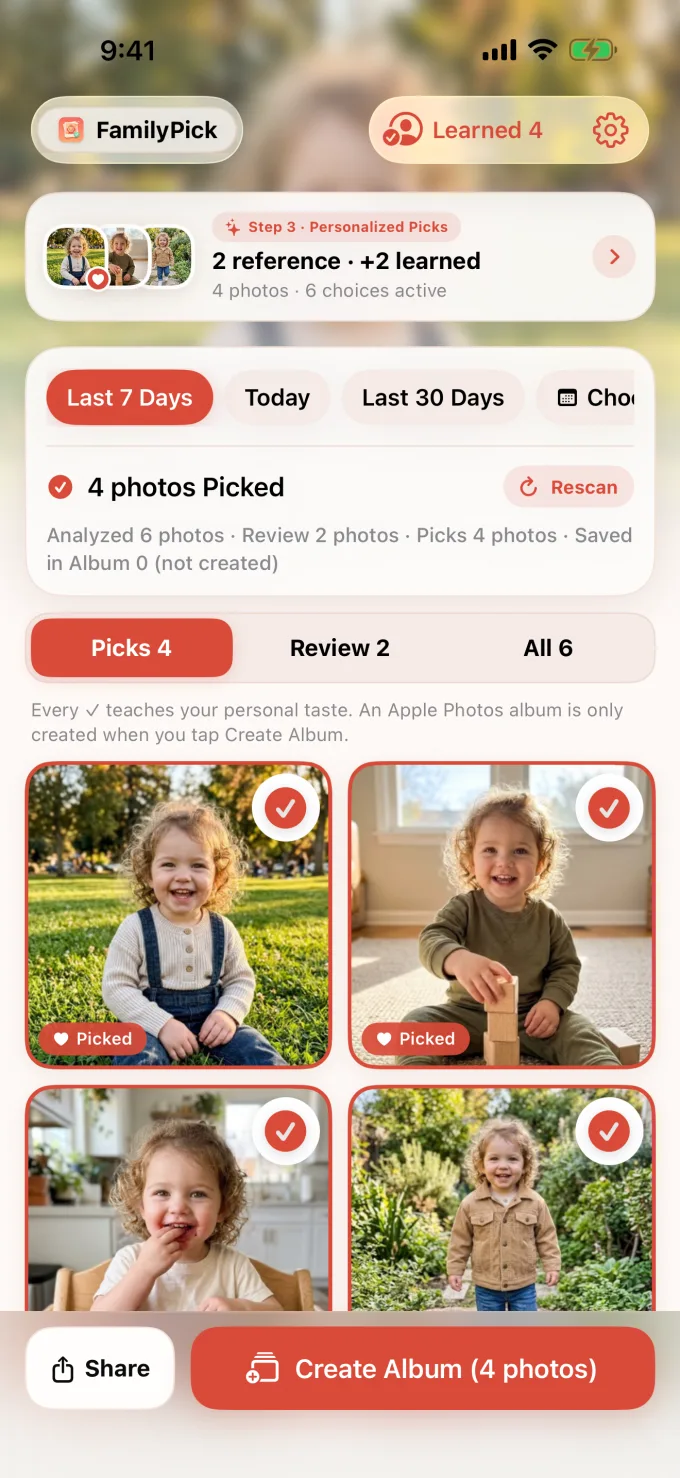
Sunny park smile ✓ Top Pick
Sunny park smile Sharp smile · Child-focused framing
Auto-Picked Favorites (4 photos) KEEP ✓
Playing with blocks✓
Playing with blocks
Berry snack time✓
Berry snack time
Outdoor walk✓
Outdoor walk
Held Back Automatically (Clutter · Framing) HOLD
Messy background held backHOLD
Messy background held back
Parent selfie held backHOLD
Parent selfie held back
🔒 On-Device Photo AI 📅 EXIF Dates Intact 🗂 Zero Album Spam ✨ Free · No Sign-Up
See how it works ↓
HOW IT WORKS · 4 SIMPLE STEPS

Less camera-roll fatigue.
More joyful sharing.

Not a generic duplicate cleaner — a personal curator that learns which moments you actually want grandparents and family to see.

Finds the keepers in seconds.
STEP 01 · AUTO PICK

Finds the keepers
in seconds.

Pick any date range and FamilyPick highlights clear, expressive photos of your child while setting aside cluttered indoor backgrounds and blurry bursts.

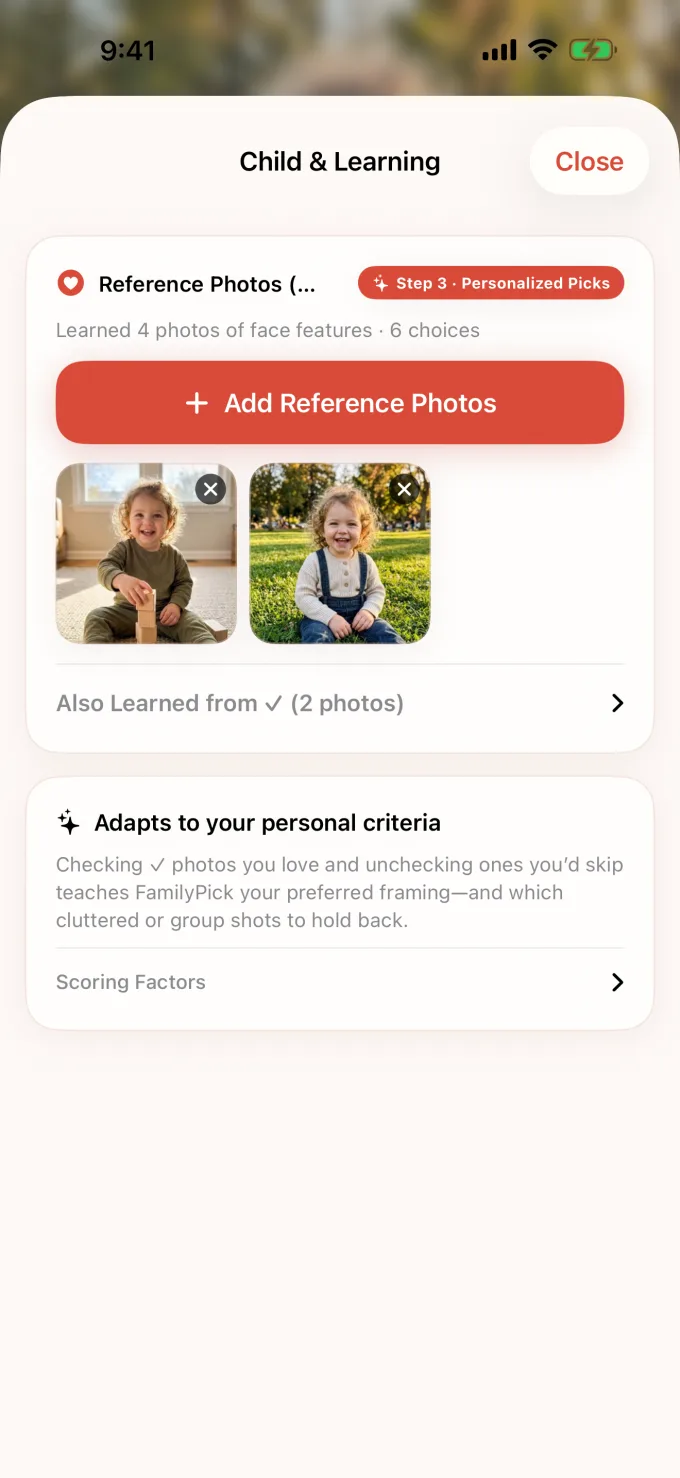
  • Recognizes your child from just 1–2 reference photos
  • Browse held-back shots anytime and include with one tap
Learns your personal family style.
STEP 02 · TASTE LEARNING

Learns your personal
family style.

Every parent curates differently. Simply check (✓) or uncheck candidates, and FamilyPick adapts to whether you prefer solo portraits, candid play, or clean backgrounds.

  • Gets smarter with every review — zero complex sliders
  • Reset learned preferences anytime in Settings
Original capture dates intact, ready for FamilyAlbum.
STEP 03 · FAMILYALBUM READY

Original capture dates intact,
ready for FamilyAlbum.

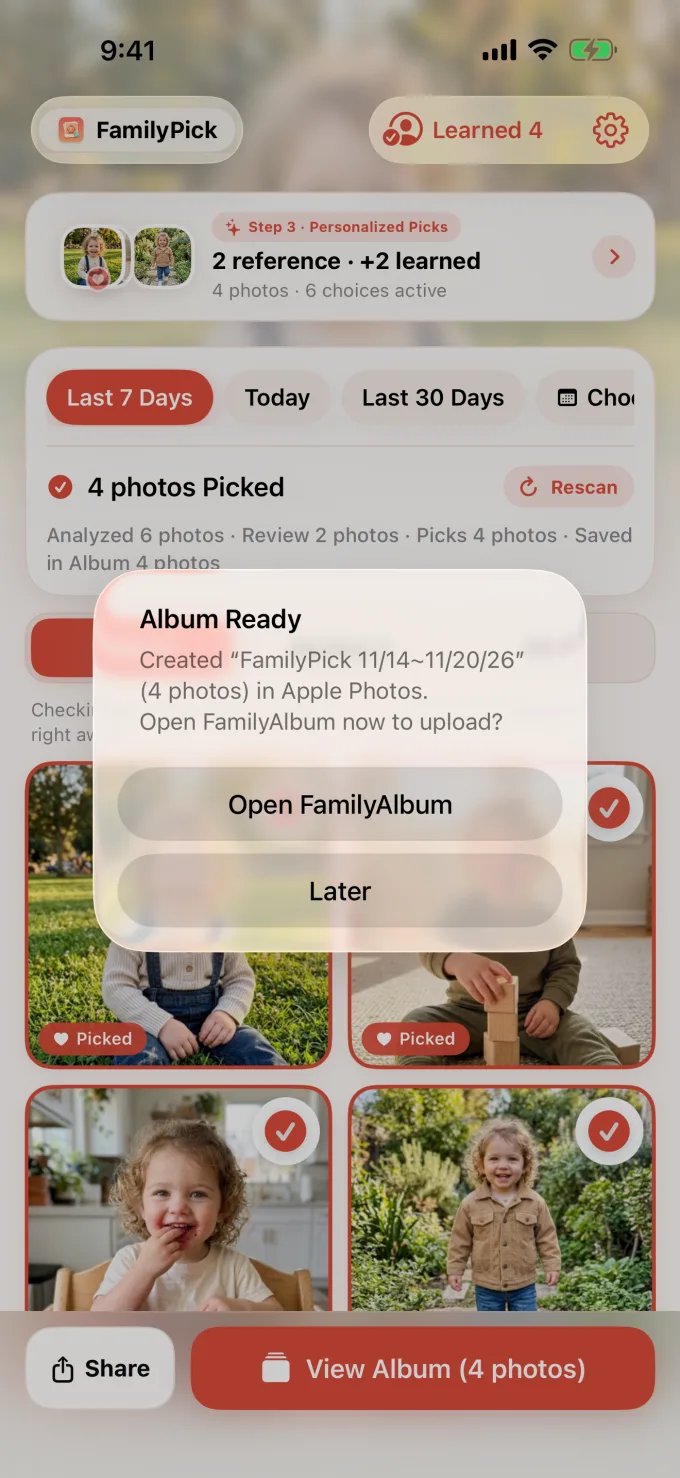
Zero automatic album clutter. An album is created in Apple Photos only when you tap 'Create Album' — then jump straight into FamilyAlbum for fast bulk upload.

  • Preserves 100% of original EXIF DateTimeOriginal metadata
  • One-tap shortcut to FamilyAlbum or iOS Share Sheet
Clean up temporary albums. Keep originals safe.
STEP 04 · SAFE CLEANUP

Clean up temporary albums.
Keep originals safe.

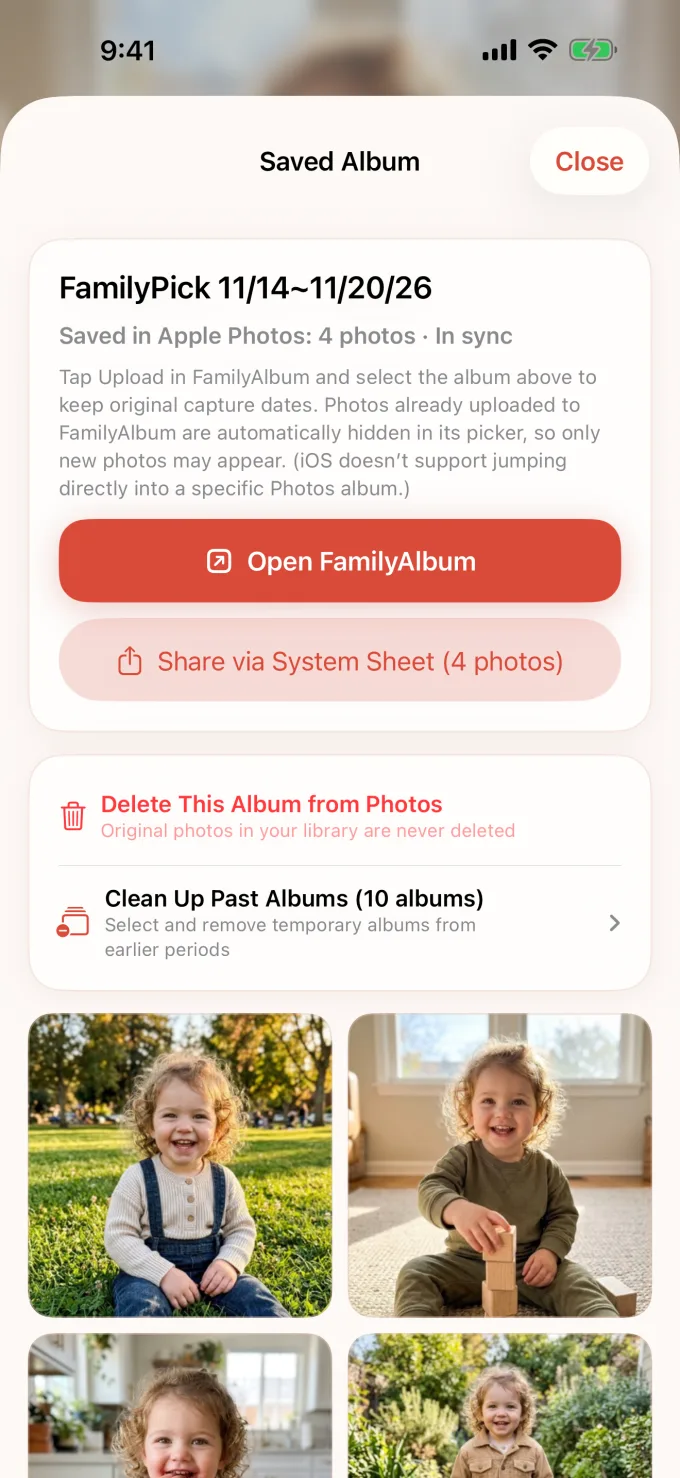
Once you've uploaded to FamilyAlbum, batch-remove past temporary albums in one tap. Photos already placed in an album are automatically skipped in future periods.

  • Deleting a candidate album never deletes original photos
  • Automatically avoids re-suggesting photos from earlier albums
🛡 100% On-Device Photo & AI · Zero Photos Ever Uploaded

100% On-Device Photo & AI Processing · Zero Photos Uploaded

Every photo scan, Apple Vision face/scene embedding, and personal taste model runs exclusively on your iPhone — zero photos or facial data are ever sent to any server.

🔒 Zero Photos Ever Uploaded

Photos, thumbnails, Vision feature vectors, filenames, and capture dates never leave your device.

🚫 No Account · No Ad Tracking

No sign-up and no IDFA or cross-app tracking — only anonymous, photo-free app interaction counts help us improve reliability.

🧠 Never Used for External AI

Your family photos are never uploaded or used to train external AI models.

🖼 Originals Never Touched

FamilyPick never deletes or alters your original Camera Roll photos.

Read Full Privacy Policy →
FAQ

Common questions from parents.

Are my child's photos ever uploaded to a server or cloud AI?

Never. Photo analysis, Apple Vision face/scene matching, and taste learning happen 100% locally on your iPhone. Zero photos, facial vectors, or photo metadata are ever transmitted to Studio Taeo or any third party.

Will FamilyPick automatically create albums without asking?

No. Candidate albums are created in Apple Photos only when you explicitly tap 'Create Album', and you can clean up temporary albums right inside the app.

Are original capture dates kept when uploading to FamilyAlbum?

Yes. Because FamilyPick links your exact original Apple Photos assets into the album without re-encoding copies, 100% of EXIF capture dates and times remain intact.

Does deleting a candidate album delete my original photos?

No. Removing a candidate album only deletes the album container — your original photos stay untouched in your Photo Library, and already-albumed photos won't be suggested twice.

Is FamilyPick free, and is it affiliated with FamilyAlbum?

FamilyPick is free on the App Store and is an independent utility built by Studio Taeo. FamilyAlbum is a trademark of MIXI, Inc.


READY IN ONE MINUTE

Catch up on family sharing
in under a minute.

Turn months of unshared camera-roll gems into a clean album ready for grandparents — with your photos kept strictly on your iPhone.

F A M I L Y P I C K
Photos uploaded0
Auto-album spam0
App priceFree
What you shareOnly the best moments ✓
ON-DEVICE PHOTO AI · NO SIGN-UP REQUIRED
Download on the App Store
App Store QR Scan with your iPhone camera
to open on the App Store